
The Rhino “Drop” Command
The “Drop” command in Rhino aids creation of
open-pit plans. The command finds the elevation of the
pit at many x, y points without interpolation errors.
To install the function, go to the “File” menu and select the
“Properties” option. The “Document Properties” dialog box shown in
will open. Chose the option “Plug-ins” from the list on the left side
of the “Document Properties” dialog box, circled in Click the
“Install” button and choose the “Drop.rhp” file. Make sure that
“Drop” is listed under “All Plug-ins” and that the “Enabled” box
next to it is checked, as shown in
fig-rhino-drop-plugin-install.
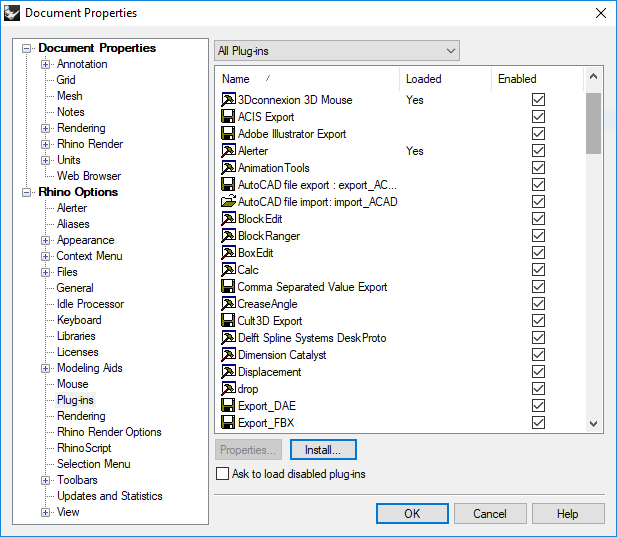
Figure 1: Installing the “Drop” command in Rhino
To use the function, open a mesh in Rhino. Import points to Rhino; these points typically match the x, y locations of the model mesh’s nodes. Type “Drop” into the command window and follow the prompts: select the mesh, press [Enter], select the points, and press [Enter] again. The points retain their x and y coordinates but adjust elevation to match the mesh surface. Export the adjusted points from Rhino as a text file for import into MINEDW.
| Was this helpful? ... | Itasca Software © 2026, Itasca | Updated: Sep 09, 2026 |
