
MPoint Modeling • Examples
Hopper Discharge
The project file for this example may be viewed/run in MPoint2D.[1] The main data file used is shown at the end of this example.
Problem Statement
This example illustrates interactions between walls and material points, and the capabilities of MPoint to model bulk material flow in a continuum manner.
The hopper shown in Figure 1 contains a cohesionless Mohr-Coulomb material with density \(\rho = 1500 \ \rm{kg/m^3}\), bulk modulus \(K = 1\) MPa, shear modulus \(G = 0.5\) MPa , and friction angle \(\phi = 30\) degrees, and dilatancy angle \(\Psi = 0\) degrees. Contact between the hopper walls and the material points uses a linear model with normal stiffness \(k_n = 10^7\) N/m and shear stiffness \(k_s = 10^6\) N/m. Parameter values are illustrative and selected for computational efficiency of this example.

Figure 1: Hopper geometry with initial material colored by layers.
Modelling Procedure
The background grid spacing is equal to 1/8 of the hopper outlet width and a resolution of 2 material point per spacing in each direction is used. Two values of the friction coefficient between the walls and material points \(f=1.0\) and \(f=0.05\) are used to obtain different discharge behaviors.
Note
Many other parameters may affect the flow regime, e.g., hopper geometry, fill height, material properties (dilation, cohesion), and may result in various discharge behaviors that users are invited to investigate for conditions relevant to their specific uses cases.
The bottom wall of the hopper is removed to trigger the discharge.
Results
In the high-frictional case (\(f=1.0\)), a funnel flow is obtained where material located directly above the outlet first flows out (Figure 2) while the material on either side of the outlet remains stagnant inside the hopper (Figure 3).
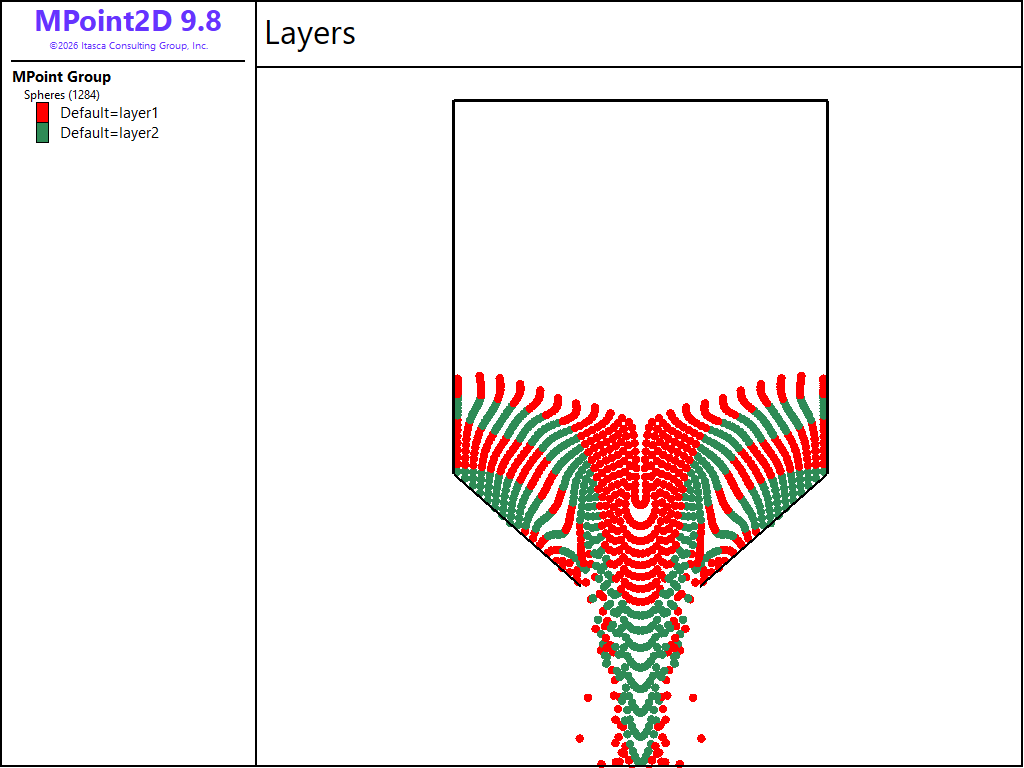
Figure 2: Funnel flow of material above the outlet in hopper with high-fricion walls.
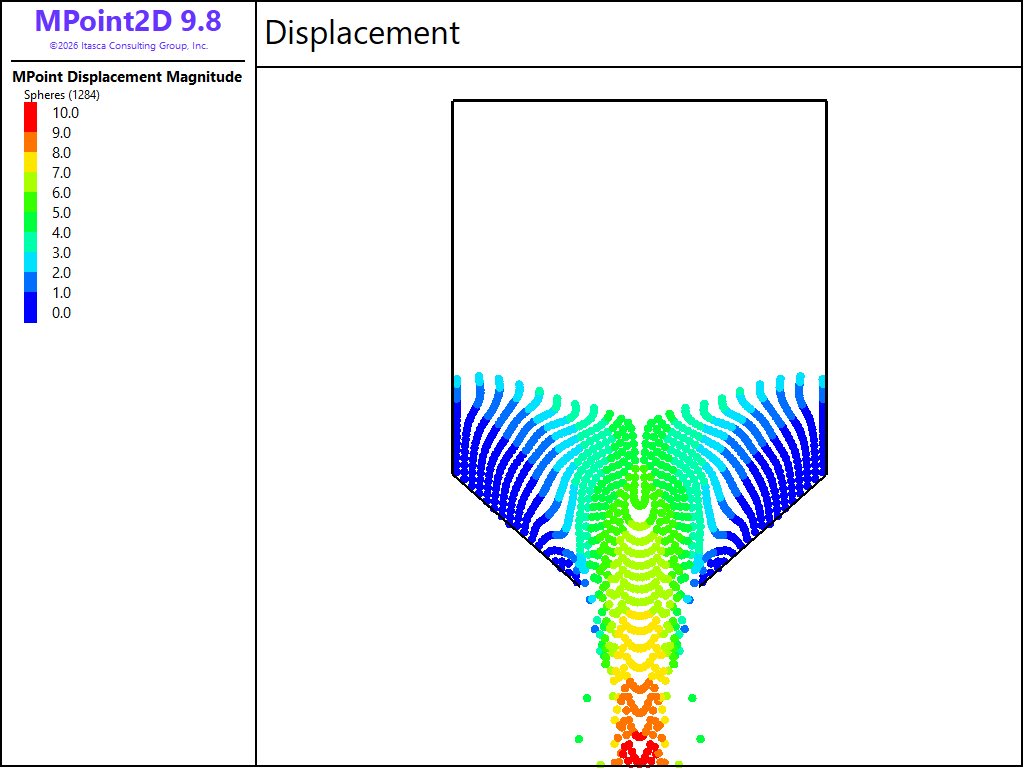
Figure 3: Small displacement of stagnant material around the hopper outlet walls during funnel flow.
In the low-frictional case (\(f=0.05\)), a mass flow is obtained where all the material inside the hopper flows vertically downards, almost layer-by-layer (Figure 4) and the displacement of the material is not significantly influenced by the proximity to the walls (Figure 5).
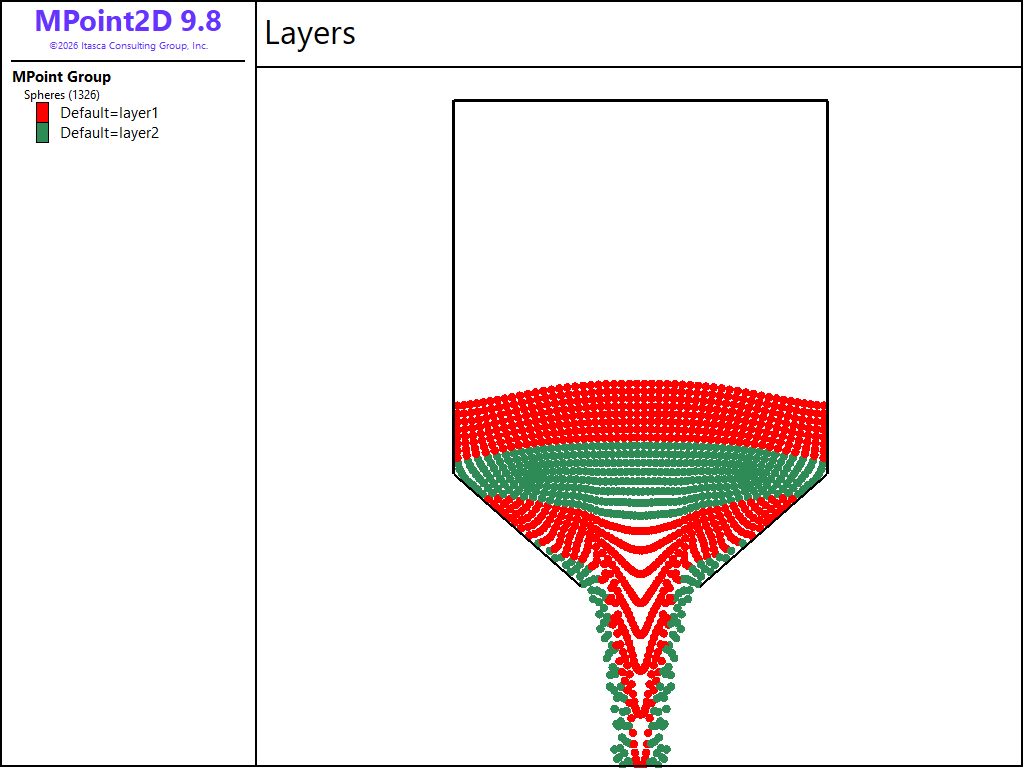
Figure 4: Mass flow of material in hopper with low-fricion walls.
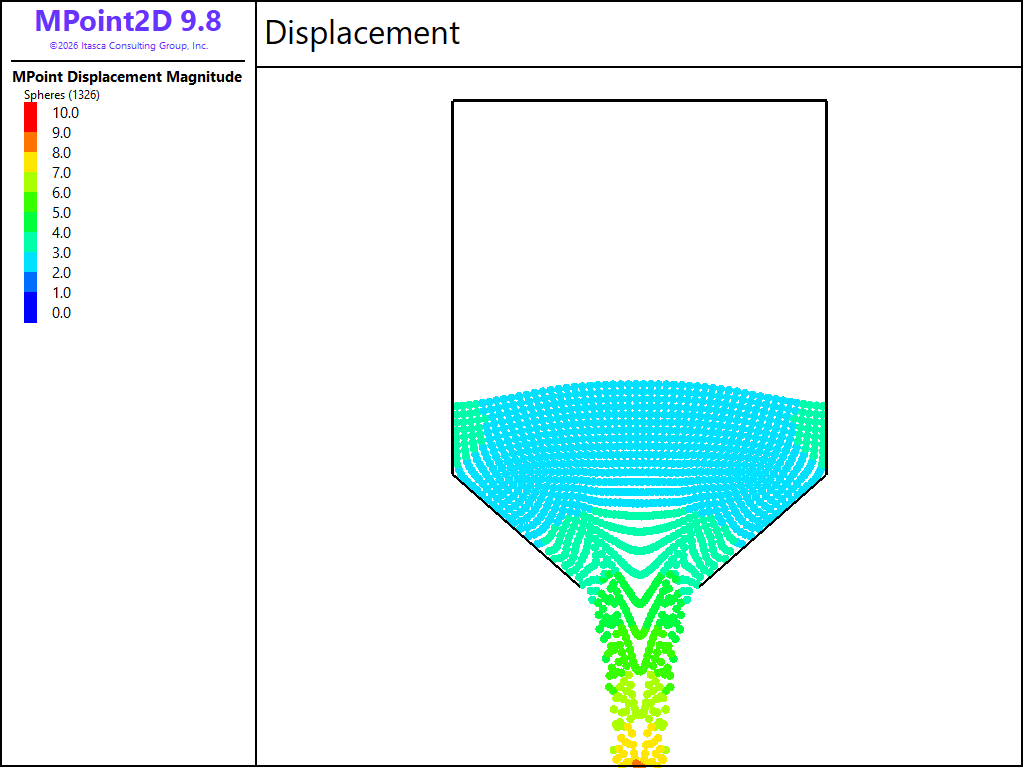
Figure 5: Large displacement of bulk material inside the hopper during mass flow.
The continuum approach to material flow provided by MPoint has a lower computational cost than discrete simulations and employs macroscopic constitutive models that are typically easier to calibrate. For proof-of-concept or coarse analyses where details of inter-particle interactions are not critical, MPoint can be a robust and efficient solution for granular flow problems.
Data File
HopperDischarge.dat
; Hopper discharge
; SI units

model new
model large-strain on
model gravity 9.81
model configure dynamic

; Hopper geometry
[R = 5]
[H = 10]
[R0 = 1.6]
[H0 = 3]
model domain extent [-R] [R] [-R] [H+H0] condition destroy
wall create id 1 vertices ([-R] [H+H0]) ([-R] [H0]) ...
                          ([-R] [H0])   ([-R0] [0]) ...
                          ([-R0] [0])   ([ R0] [0]) ...
                          ([ R0] [0])   ([ R] [H0]) ...
                          ([R] [H0])   ([R] [H+H0]) ...
                          ([R] [H+H0]) ([-R] [H+H0])

; Generate mpoints inside hopper
[spacing = R0/4]
[Hfill = 0.5*H]
mpoint node spacing [spacing]
mpoint generate resolution 2 range position-x [-R] [R] ...
                                   position-y 0 [H0+Hfill]
fish define removeMPoints()
    wp = wall.find(1)
    loop foreach local mp mp.list
        if wall.inside(wp,mpoint.pos(mp)) = 0
            mpoint.delete(mp)
        endif
    endloop
end
[removeMPoints]

; Group mpoints in layers for display
[num_layers = 5]
[dlayer = (H0+Hfill)/num_layers]
fish define layering
    loop local i (0, num_layers-1)
        local lo = i*dlayer
        local hi = (i+1)*dlayer
        local groupname = string.build('layer%1',i%2+1)
        command
            mpoint group [groupname] range position-y [lo] [hi]
        endcommand
    endloop
end
[layering]

; Constitutive and Contact models
mpoint cmodel assign mohr-coulomb
mpoint property density 1500 bulk 1e6 shear 0.5e6 ...
         cohesion 0 tension 0 friction 30 dilation 0

contact cmat default model linear ...
        property kn 1e7 ks 1e6 lin_mode 1

model save 'hopper_ini'

; -- High friction walls: funnel flow -- ;
contact cmat default property fric 1.0
wall delete facets range id 3; open the hopper
model step 2000
model save 'funnel'

; -- Low friction walls: mass flow -- ;
model restore 'hopper_ini'
contact cmat default property fric 0.05
wall delete facets range id 3; open the hopper
model step 1000
model save 'mass_1'
model step 1000
model save 'mass_2'
Endnote
| Was this helpful? ... | Itasca Software © 2026, Itasca | Updated: Sep 30, 2026 |
