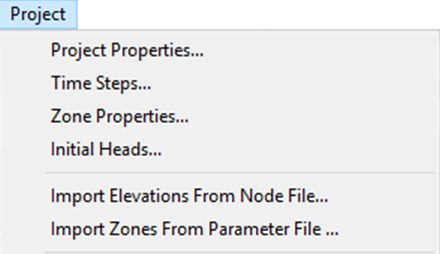
Initial Head - Initial hydraulic head conditions throughout the model
domain (Initial Conditions)
Data Import/Export
Import Elevations from Node File - Imports node elevation file
(node.fem) for models modified in other tools or MINEDW versions (
Model Geometry)
Import Zones from Parameter File - Imports zone parameter file
(para.fem) for hydraulic properties modified externally (
Zone Properties – Hydraulic Parameters)
The Mesh Menu
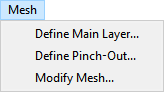
The Mesh menu provides tools for mesh generation and modification (see
Figure 5). Detailed information is available in
Model Geometry.
Figure 5: The “Mesh” drop-down menu
Mesh Construction
Define Main Layer - Creates main layers throughout the
model domain
Define Pinch-Out - Refines vertical discretization in
selected areas
Modify Mesh - Refines or extends mesh for selected areas using
boundary line files (.BLN)
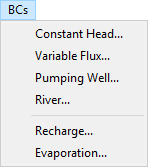
The BCs Menu
The BCs (Boundary Conditions) menu provides tools for defining model
boundary conditions and sources/sinks (see Figure 6). Detailed
information is provided in
Boundary Conditions.
Figure 6: The “BCs” menu
Fixed Boundaries
Constant Head - Specified head boundaries including constant/variable
with time and drain nodes
Variable Flux - Time-variant boundary fluxes and semi-infinite aquifer
connections
Sources and Sinks
Pumping Well - Pumping wells, specified head wells, lowest pumping
elevation (LPE) wells
River - Rivers and tributary networks with groundwater exchange
Surface Processes
Recharge - Precipitation recharge zones across model domain
Evaporation - Evapotranspiration and bare soil evaporation losses
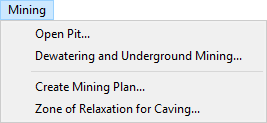
The Mining Menu
The Mining menu provides specialized tools for simulating mining
operations (see Figure 7). Note: This menu is not
active for steady-state simulations. Details are in
Mining Plan.
Figure 7: The “Mining” drop-down menu
Open-Pit Mining
Open Pit - Complete open-pit mining simulation including mine plan
import, pit-lake setup, ZOR creation, and backfilling operations
Create Mining Plan - Creates progressive excavation files for open-pit
mines
Underground Mining
Dewatering and Underground Mining - Simulates underground operations
with time-varied hydraulic conductivity, post-mining recovery, and
backfilling
Zone of Relaxation for Caving - Creates input files for caving-related
ZOR analysis
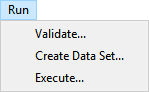
The Run Menu
The Run menu provides model validation and execution functions (see
Figure 8). Details are in Model Execution.
Figure 8: The “Run” drop-down menu
Simulation Workflow
Validate - Verifies that the groundwater model is correctly defined
and ready for simulation
Create Data Set - Creates ASCII format data files required for
MINEDW calculations
Execute - Starts the simulation process
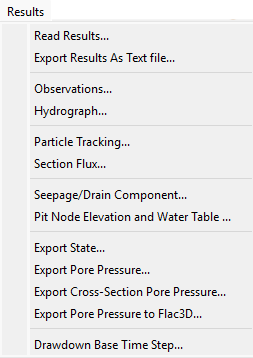
The Results Menu
The Results menu provides comprehensive post-processing and analysis
tools for model output visualization and data export (see
Figure 9). Details are provided in Model Output.
Export Pore Pressure to FLAC3D - Export for geomechanical analysis
Reference Settings
Drawdown Base Time Step - Set reference time for drawdown calculations
Edit Menu
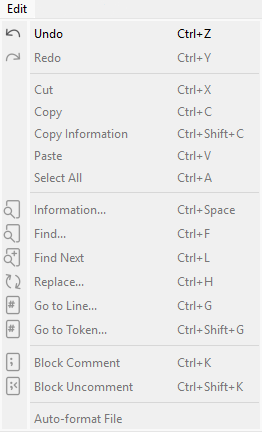
The Edit menu provides undo and redo functionality for model changes (see Figure 10).
Figure 10: The “Edit” drop-down menu
Edit Operations
Undo - Reverse recent model changes (except node modifications)
Redo - Restore previously undone changes
The Tools Menu
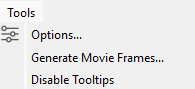
The Tools menu provides interface configuration and layout options (see
Figure 11).
Figure 11: The “Tools” drop-down menu
Tool Operations
Options - Opens MINEDW Options dialog for display settings, movie
options, and startup preferences (see Options Dialog
for detailed configuration settings)
Generate Movie Frames - Creates image sequence of current view
for animation
Disable Tooltips - Turns off pop-up descriptions for interface tools
The Help Menu
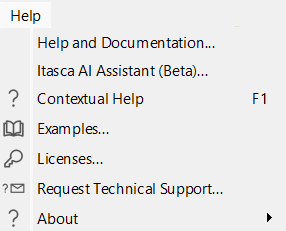
The Help menu provides documentation, support information, and software
details (see Figure 12).
Figure 12: The “Help” drop-down menu
Documentation & Support
Help and Documentation - Access to user manual and technical information
Itasca AI Assistant - Opens AI chat for user questions and guidance
Contextual Help - Opens documentation to current topic
Examples - Access to example projects and tutorials
Licesnses - View software license information
Request Technical Support - Opens form to contact Itasca support
About - About MINEDW, Software version, and Credits