
Section Flux
This function calculates groundwater flux across a user-defined
cross-sectional area. The inputs, shown in
fig-section-flux-dialog, are x and y coordinates of the
start and end points plus z
coordinates of the top and bottom of the area for flux
calculation. Press “Calculate” to compute
flux in m3/day or ft3/day and display the result at
the bottom of the dialog box. Click “OK” to close the “Section Flux”
dialog box.
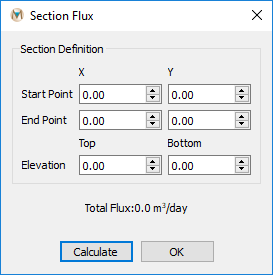
Figure 1: The “Section Flux” dialog box
| Was this helpful? ... | Itasca Software © 2026, Itasca | Updated: Sep 09, 2026 |
