
Hydrograph
To create hydrographs from simulation results, use the “Hydrograph”
function under the “Results” drop-down menu. Ensure model results
are imported from the .PLB file. In the “Create Hydrograph File”
dialog box, choose a directory for the hydrograph file,
enter a name, then click “Save.” Groundwater-head data from
monitoring boreholes and piezometers exports to a .DAT file.
This file includes time steps, dates, well
IDs, and groundwater-head data for all
time steps. If the monitoring location becomes dewatered during
simulation (groundwater head drops below the monitoring level),
the hydrograph file contains “unsat” appended to the head value.
If the monitoring location is mined out during simulation, the
hydrograph file contains “mined” appended to the head value.
Plot this data using Excel or other plotting software, as shown in
fig-hydrograph-plotting.
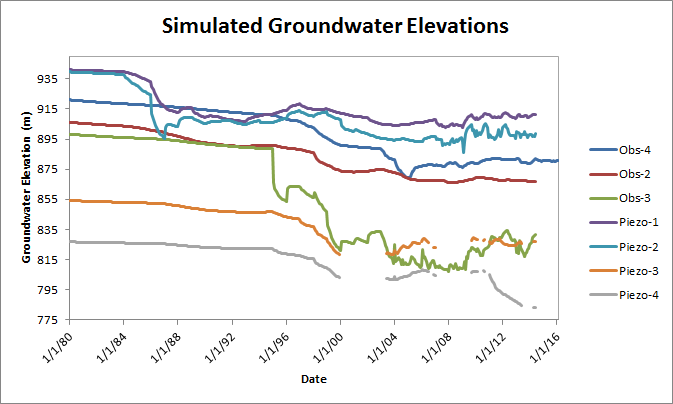
Figure 1: Plotting hydrograph data from MINEDW
| Was this helpful? ... | Itasca Software © 2026, Itasca | Updated: Sep 09, 2026 |
