
Face Plot Item
Description
Model face information.
Attributes
Show Color-By Color-List Hide-Null Highlighted Selected Selected Only Map Def-fac Polygons Transparency Legend
Show

Set which faces to show.
Show: Select from the choices: “Surface” to display surface faces only; “All” to display all faces, internal and external; and “Grouped” to display surfaces by face group assignment.
Color-By

Specify how faces should be colored. Some options will require additional, dynamically-provided attributes in order to complete the selection; these are indicated with notations on the table.
Color-By: select from the following options.
Table 1: Selection Options for Color-By Density
Model
Extraᵉ
Multiplier
Face Extraᵉ
Propertyᵖ
Face Groupsˢ
Stateᵗ
Fluid Density
Thermal Propertyᵖ
Fluid Propertyᵖ
Type
Groupˢ
Uniform
Key: |
ᵉAn “Index” attribute follows |
ᵖA “Property” attribute follows |
ˢA “Slot” attribute follows |
ᵗA “State By” attribute follows |
- orphan:
Color-List

Set properties of the line used for the item color-list. See the standard color-list control description for details.
Hide-Null
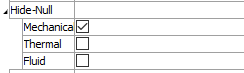
Control display of faces of null zones.
Hide-Null: Specify (checked) that faces of null zones should not be displayed. The field contains a list of different zone types.
[item]: Hide (checked) null zone face of [item] type.
- orphan:
Hide-Null
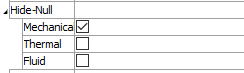
Control display of null zones within the plot.
Hide-Null: Specify (checked) that null zones should not be displayed. The field contains a list of different zone types.
[item]: Hide (checked) null zone of [item] type.
Highlighted Selected

Show selected faces.
Highlighted Selected: Show and highlight selected (checked) faces, even if they would not otherwise be displayed.
Selected Only

Show selected faces only.
Selected Only: Show selected (checked) faces only.
- orphan:
Map
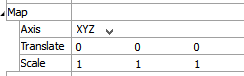
Map the item to new model coordinates. See the standard map control description for details.
- orphan:
Def-fac

Set the deformation factor. See the standard def-fac control description for details.
- orphan:
Polygons

Set properties of item facets. See the standard polygons control description for details.
- orphan:
Transparency

Set the transparency of the plot item. See the standard transparency control description for details.
- orphan:
Legend
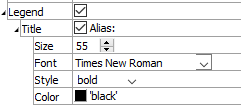
Set item labeling in the plot legend. See the standard legend control description for details.
Beneath Title, the Face plot item also provides controls in Legend for Color-List, Count, Map, and Def-Fac.
| Was this helpful? ... | Itasca Software © 2026, Itasca | Updated: Sep 09, 2026 |
