
Editor Options
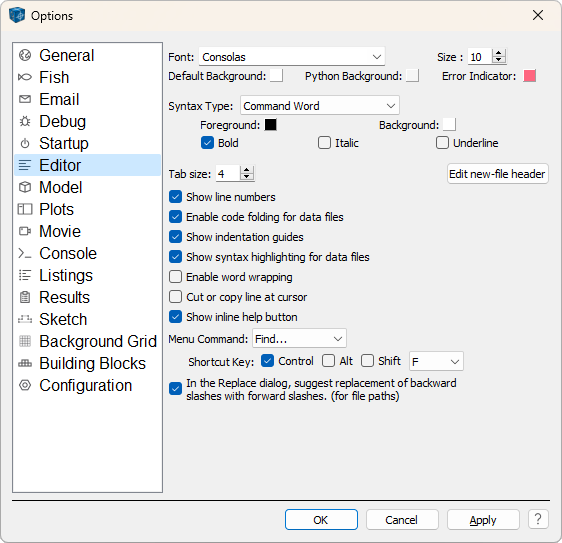
- \(Font, Size\)
Select the font face and the size of text to be used in the editor.
- \(Default Background, Python Background,\) and \(Error Indicator\)
Specify the background color of the editor, the background color of the Python console, and the color used to highlight errors in the code.
- Syntax Settings (\(Syntax type\) et al.)
Use the select box to choose the \(Syntax Type\) to format. Once selected, use the color swatches to set the \(Foreground\) and \(Background\) colors for display of that syntax type, and use the \(Bold\), \(Italic\), and \(Underline\) check boxes to further format the text as desired.
- \(Tab size\)
Set the size of a tab (in space characters).
- \(Edit new file header\)
Call a dialog that can be used to specify text that will be automatically inserted at the top of any new file that is created.
- \(Show line numbers\) through \(Enable word wrapping\)
See the topic Local Options for these five options. In each case, checking turns on the indicated option.
- \(Cut or copy line at cursor\)
When this box is checked, the keystroke command Ctrl + C will copy the entire line containing the cursor, and Ctrl + X will cut the entire line.
- \(Menu Command\)
The Editor commands available in the select box may be assigned new shortcut keys using the Shortcut Key controls that appear below it.
- \(In the Replace dialog...\)
When this is checked, if a highlighted portion of text contains backslashes (\) at the time the Replace dialog is called, the “Replace With” field of the dialog will automatically be filled with a suggested replacement that changes the backslashes to forward slashes.
- Apply
Pressing Apply will implement any option changes that have been made without exiting the dialog.
- Help

Pressing
will open the documentation to this topic.
| Was this helpful? ... | Itasca Software © 2026, Itasca | Updated: Sep 09, 2026 |
