
Shear Wave On Stiff Wall In Soft Soil: Dynamic Multi-Stepping (FLAC3D)
The project file for this example may be viewed/run in FLAC3D.[1] The main data file used is shown at the end of this example.
This small and simple example illustrates the effect of dynamic multi-stepping. The model consists of a “wall” of material with a modulus 150 times greater than the surrounding material. A shear wave is applied at the base of the model for a 1 s time period.
With zone dynamic multi-step on, 340 zones have a multiplier of 1, and 2660 zones have a multiplier of 8. The calculation is three times faster with dynamic multi-stepping on a 6-core CPU. The \(x\)-velocity histories monitored at the base of the model and top of the wall are identical with and without multi-stepping. Figure 1 plots the histories for the multi-stepping run.
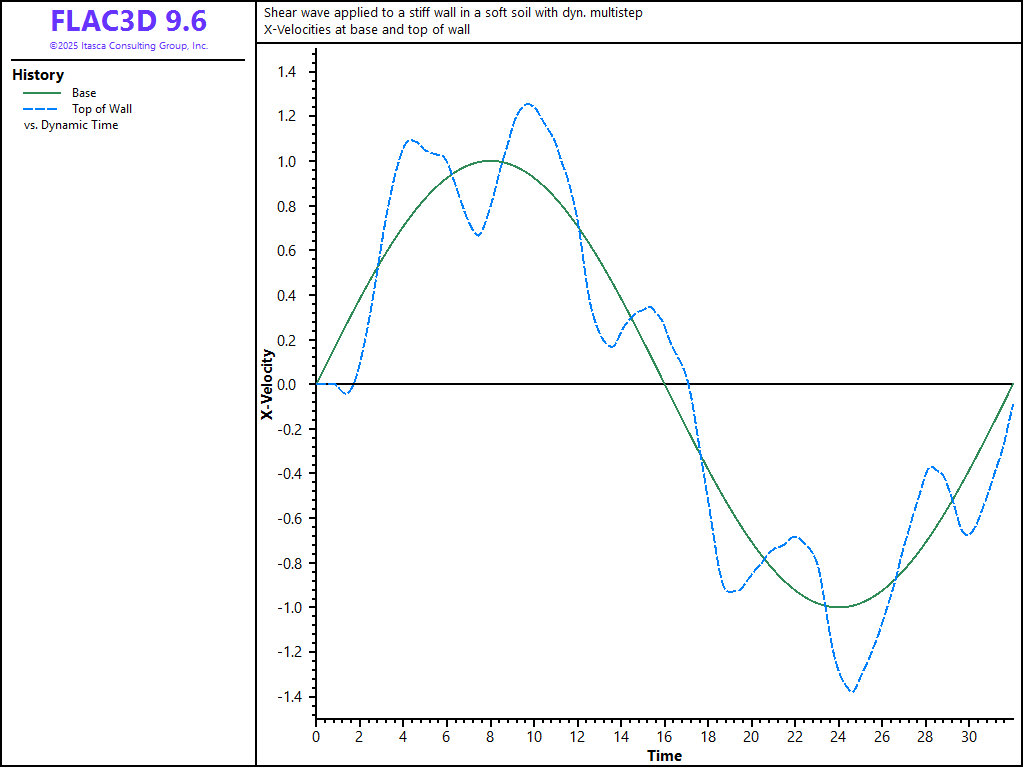
Figure 1: x-velocities at model base and top of wall.
Data File
ShearWaveOnStiffWallInSoftSoil.dat
model new skip fish,table
model large-strain off
;---------------------------------------------------------------------
;              Dynamic Example
;              Shear wave applied to a stiff wall in a soft soil
;              With dynamic multistep
;---------------------------------------------------------------------
model title ...
      'Shear wave applied to a stiff wall in a soft soil with dyn. multistep'
model configure dynamic
;
; Create zones
zone create brick size 80 20 40 ...
                  point 0 (-5,0,0) point 1 (15,0,0) ...
                  point 2 (-5,5,0) point 3 (-5,0,10)
zone face skin ; Label model boundaries
;
; Assign model and properties
zone cmodel assign elastic
zone null range position-x=-5,5 position-z=5,10
zone property young 20e4 poisson 0.2 density 2000
zone property young 30e6 range position-x=5,6 position-z=5,10
;
; Boundary conditions
zone face apply velocity-z 0 range group 'East' or 'West'
zone face apply velocity-normal 0 range group 'North' or 'South'
fish define wave
    wave = math.sin(math.pi * dynamic.time.total / 16.0)
end
zone face apply velocity-x = 1 fish wave range group 'Bottom'
zone face apply velocity-normal 0         range group 'Bottom'
;
; Histories
zone history name='xvelb' velocity-x position (5,2, 0)
zone history name='xvelt' velocity-x position (5,2,10)
zone history name='zvelt' velocity-z position (5,2,10)
model history name='time' dynamic time-total
;
; Set multi-step status, and cycle to 32, timing how long that takes
zone dynamic multi-step [multi]
[global start = time.clock]
model solve time-total 32.0
[global time = 0.01 * (time.clock - start)]
[time]
Endnote
| Was this helpful? ... | Itasca Software © 2026, Itasca | Updated: Feb 07, 2026 |
